
Declarations and native access
P.Text, P.Button, P.Vertical, P.Horizontal and every catalog factory return deferred View declarations. Mount builds each occurrence once, then applies props and references before activation.
| API | Behavior |
|---|---|
children: new[] { ... } | Nested child/modifier composition inside a factory. |
children: () => views | Tracked child collection with retained declaration identity. |
components: new[] { ... } | Static modifier/Self attachments alongside reactive children. |
P.Self(view) | Explicit same-GameObject placement. |
P.Declare<T>(configure, reference, modifier, active) | Custom native component using the same ownership rules. |
P.Mount(view) / P.Mount(Func<View>) | Explicit mount with scope, native root and canvas. |
reference: Action<NativeType> | Capture the built native component before activation. |
configure: Action<NativeType> | One-time native configuration after named props and children. |
UnityEngine.UI.Button native = null;
var view = P.Button("Save", reference: button => native = button);
using var mount = P.Mount(view);
native.onClick.Invoke();
Named parts and typed links
Declare each control part in its named argument. Pine builds and wires the declared objects before activation; only omitted parts receive defaults. Native objects supplied directly remain externally owned. Assets such as sprites, fonts, materials and Animator controllers are supplied by your project.
var handle = P.Ref<UnityEngine.UI.Graphic>();
var first = P.Ref<UnityEngine.UI.Button>();
var second = P.Ref<UnityEngine.UI.Button>();
var view = P.Vertical(
    children: new[]
    {
        P.Slider(
            fill: P.Image(color: Color.green),
            handle: P.Image(reference: handle, sizeDelta: new Vector2(20, 24)),
            targetGraphic: handle
        ),
        P.ScrollRect(
            viewport: P.Frame(children: new[] { P.RectMask2D() }),
            content: P.Vertical(children: new[] { P.Text("Row") })
        ),
        P.Button(
            "First",
            reference: first,
            navigation: new Value<UnityEngine.UI.Navigation>(() =>
                new UnityEngine.UI.Navigation
                {
                    mode = UnityEngine.UI.Navigation.Mode.Explicit,
                    selectOnDown = second.Value,
                }
            )
        ),
        P.Button(
            "Second",
            reference: second,
            navigation: new Value<UnityEngine.UI.Navigation>(() =>
                new UnityEngine.UI.Navigation
                {
                    mode = UnityEngine.UI.Navigation.Mode.Explicit,
                    selectOnUp = first.Value,
                }
            )
        ),
    }
);
Typed refs publish during construction, so forward and cyclic links resolve before native activation. Removing a target clears its ref and updates tracked relationships. Reuse each live ref for one target; call native methods through its Value when the relevant Unity lifecycle permits them. Typed refs · Native parts.
Use caption for Button/Toggle labels, template and item for dropdown hierarchies, and textComponent/placeholder/viewport for TMP input fields. A part declaration must supply the expected component on its root; P.Frame(children: new[] { P.Self(P.Text("Label")) }) can supply a TMP caption. Use nested factory children to describe the rest of the hierarchy.
P.Animator(runtimeAnimatorController: controller) attaches a supplied animation controller. P.PlayerInput(uiInputModule: moduleRef) wires a declared input module. Multiplayer EventSystems, tracked-device raycasters and virtual-mouse components are included when the Input System backend is enabled. Hardware support still depends on Unity's device/runtime support.
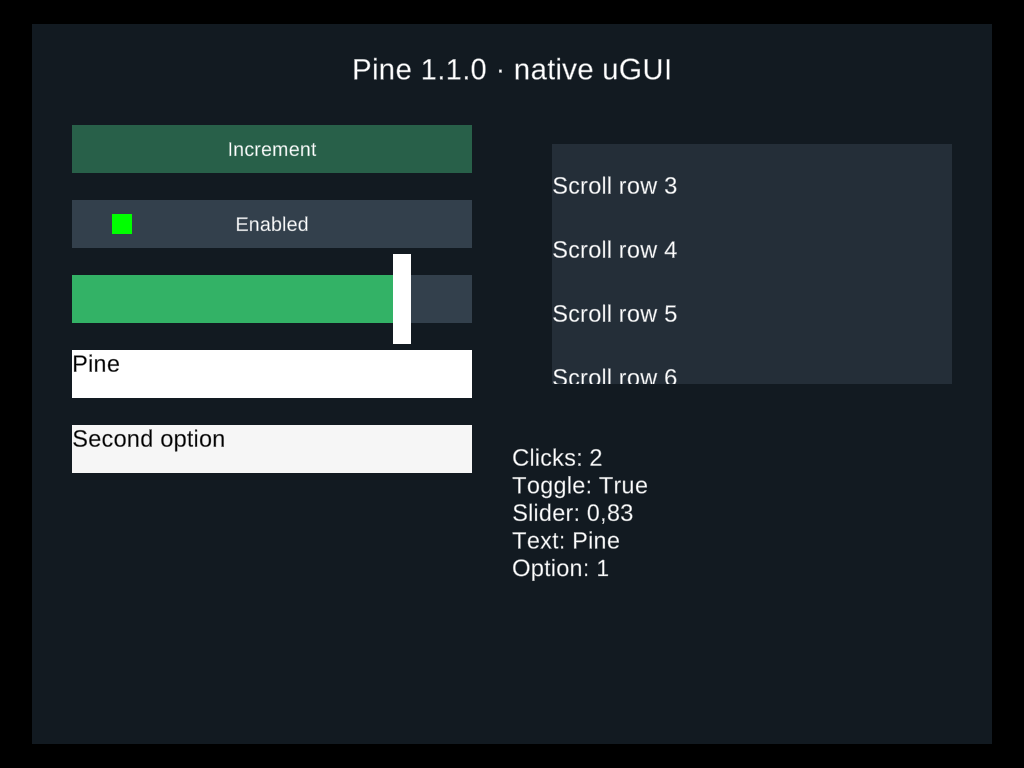
This desktop Editor capture follows simulated mouse, text, keyboard and gamepad interaction through native uGUI. It verifies this scenario's rendering; physical devices and other platforms are unverified. See the package's compatibility record.
The imperative P.Create<T>, P.Apply, P.Bind, typed property groups and custom native events remain available for advanced integration. They return live native components and require an ownership scope. Their TextProperty, VerticalProperty and HorizontalProperty helpers have distinct names from the new view factories. Use View declarations in children and components; for imperative property entries, use named props or configure instead.