Bind Unity UI to reactive C# state
Data binding keeps an interface synchronized with explicit state. This example binds a score, a level, a derived rank, a text color, and a reset button.
Run the example
Complete the Pine installation steps, including TextMeshPro resources and the Input System backend. Save the script with the filename shown, attach it to an empty GameObject, and enter Play Mode. Pine creates the Canvas and child UI from this script.
Download PineBindings.cs. The source is MIT licensed, like Pine.
using Pine;
using TMPro;
using UnityEngine;
using UnityEngine.UI;
using UI = Pine.Pine;

namespace PineDocs.Examples
{
    public sealed class PineBindings : MonoBehaviour
    {
        public readonly Source<int> Score = UI.Source(0);
        public readonly Source<int> Level = UI.Source(1);
        private MountHandle _mount;

        private void OnEnable()
        {
            _mount = UI.Mount(() =>
            {
                var rank = UI.Derive(() => Score.Value >= 30 ? "Explorer" : "Beginner");
                return UI.Column(UI.Name("Data binding"), UI.Size(520, 380),
                    UI.Configure<VerticalLayoutGroup>(g => g.padding = new RectOffset(24, 24, 20, 20)),
                    UI.Label("Data binding", UI.FontSize(32), UI.PreferredSize(472, 48)),
                    UI.Label(() => $"Level {Level.Value} | Score {Score.Value}", UI.PreferredSize(472, 40)),
                    UI.Label(rank, UI.Name("Rank"), UI.PreferredSize(472, 40),
                        UI.Set<TextMeshProUGUI, Color>("Rank color", (label, color) => label.color = color,
                            () => Score.Value >= 30 ? new Color(0.35f, 0.81f, 0.59f) : Color.white)),
                    UI.Button("Gain 10 points", GainPoints, UI.PreferredSize(472, 48)),
                    UI.Button("Advance level", AdvanceLevel, UI.PreferredSize(472, 48)),
                    UI.Button("Reset", ResetProgress,
                        UI.Enabled(() => Score.Value != 0 || Level.Value != 1), UI.PreferredSize(472, 48)));
            });
        }

        public void GainPoints() => Score.Value += 10;
        public void AdvanceLevel() => UI.Batch(() =>
        {
            Level.Value++;
            Score.Value = 0;
        });
        public void ResetProgress() => UI.Batch(() =>
        {
            Level.Value = 1;
            Score.Value = 0;
        });

        private void OnDisable()
        {
            _mount?.Dispose();
            _mount = null;
        }
    }
}
In Unity
Follow the data flow
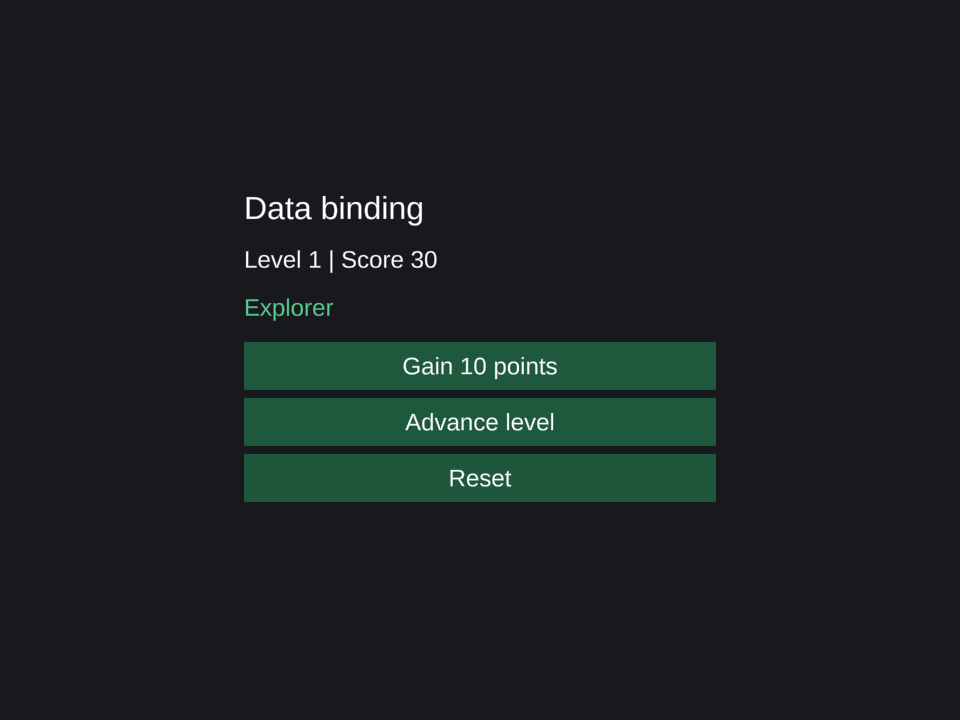
Click Gain 10 points three times. The score label changes immediately, the derived rank becomes Explorer, its text turns green, and Reset becomes interactable. UI.Set<TextMeshProUGUI, Color> identifies the native component and value type for the custom color binding.
Each getter collects the sources it actually reads. A later assignment reruns the dependent work. Configure<T> is useful for fixed setup such as the panel padding; reactive getters belong in Label, a property helper, or Set<T, TValue>.
Batch related changes
Advance level updates the level and resets the score inside one UI.Batch. Scheduled observers run after the batch completes, so bindings see the combined result. Reset uses the same pattern. Derived reads inside a batch can still obtain current values; batching defers scheduled observer execution.
Create derived values and bindings under the mount so their lifetime matches the screen. OnDisable releases that mount; the component's state survives re-enabling.
For a native input control, ToggleValue, SliderValue, and InputValue provide two-way bindings after its native graphics, handles, or text viewport are configured. See the events and bindings reference.
Continue with reactive state, batching and reactive inputs, or spring animation.