Build a reactive game HUD in Unity
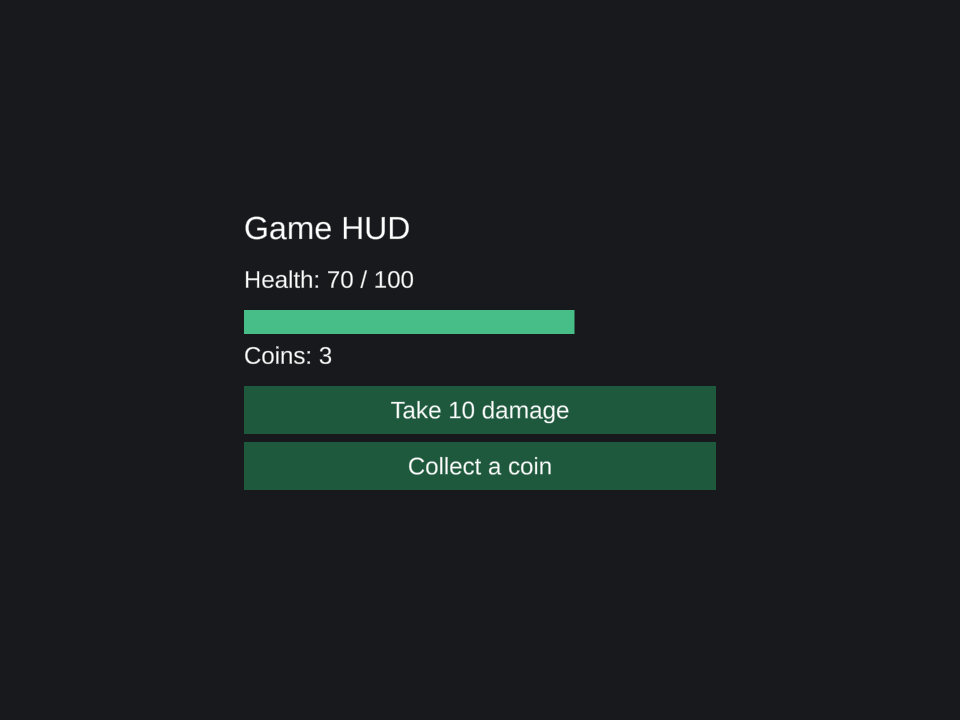
A HUD reflects gameplay state. This example renders health, a health bar, and a coin count. Its two buttons simulate gameplay events.
Run the example
Complete the Pine installation steps, including TextMeshPro resources and the Input System backend. Save the script with the filename shown, attach it to an empty GameObject, and enter Play Mode. Pine creates the Canvas and child UI from this script.
Download PineHud.cs. The source is MIT licensed, like Pine.
using Pine;
using UnityEngine;
using UnityEngine.UI;
using UI = Pine.Pine;

namespace PineDocs.Examples
{
    public sealed class PineHud : MonoBehaviour
    {
        public readonly Source<int> Health = UI.Source(100);
        public readonly Source<int> Coins = UI.Source(0);
        private MountHandle _mount;

        private void OnEnable()
        {
            _mount = UI.Mount(() =>
            {
                var ratio = UI.Derive(() => Mathf.Clamp01(Health.Value / 100f));
                return UI.Column(
                    UI.Name("Game HUD"), UI.Size(520, 340),
                    UI.Configure<VerticalLayoutGroup>(g => g.padding = new RectOffset(24, 24, 20, 20)),
                    UI.Label("Game HUD", UI.FontSize(32), UI.PreferredSize(472, 48)),
                    UI.Label(() => $"Health: {Health.Value} / 100", UI.PreferredSize(472, 36)),
                    UI.Frame(UI.PreferredSize(472, 24),
                        UI.Image(UI.Name("Health fill"),
                            UI.Configure<RectTransform>(r =>
                            {
                                r.anchorMin = r.anchorMax = new Vector2(0, 0.5f);
                                r.pivot = new Vector2(0, 0.5f);
                            }),
                            UI.Size(() => new Vector2(472 * ratio.Value, 24)),
                            UI.Tint(new Color(0.28f, 0.74f, 0.53f)))),
                    UI.Label(() => $"Coins: {Coins.Value}", UI.PreferredSize(472, 36)),
                    UI.Button("Take 10 damage", () => Damage(10),
                        UI.Enabled(() => Health.Value > 0), UI.PreferredSize(472, 48)),
                    UI.Button("Collect a coin", CollectCoin, UI.PreferredSize(472, 48)));
            });
        }

        public void Damage(int amount) => Health.Value = Mathf.Clamp(Health.Value - amount, 0, 100);
        public void CollectCoin() => Coins.Value++;

        private void OnDisable()
        {
            _mount?.Dispose();
            _mount = null;
        }
    }
}
In Unity
Connect the HUD to gameplay
Keep a reference to PineHud from your gameplay controller. Call Damage(amount) when a hit lands and CollectCoin() when a pickup is collected, on Unity's main thread. The example buttons call these same methods; replace those simulation buttons with your own game events when integrating the HUD.
Health and Coins are explicit sources. Label reads them in getters, while the derived ratio calculates health-bar width. Assigning a source updates the dependent bindings; no per-frame HUD polling is needed. The bar has a left-edge pivot so its width grows from the left.
Ownership and re-enabling
OnEnable creates a mount. OnDisable disposes it, including labels, button callbacks, and the derived calculation. The component's health and coin sources remain, so re-enabling builds a fresh UI with the current gameplay values.
Read the reactive state tutorial, the creation and bindings API, or build a dynamic inventory list.