Create dynamic Unity UI lists with stable IDs
Inventory records need stable identity when their quantity or position changes. This example uses permanent item IDs to retain each UI row.
Run the example
Complete the Pine installation steps, including TextMeshPro resources and the Input System backend. Save the script with the filename shown, attach it to an empty GameObject, and enter Play Mode. Pine creates the Canvas and child UI from this script.
Download PineInventory.cs. The source is MIT licensed, like Pine.
using System.Collections.Generic;
using System.Linq;
using Pine;
using TMPro;
using UnityEngine;
using UnityEngine.UI;
using UI = Pine.Pine;

namespace PineDocs.Examples
{
    public sealed class PineInventory : MonoBehaviour
    {
        public sealed class Item
        {
            public int Id { get; }
            public string Name { get; }
            public int Quantity { get; }
            public Item(int id, string name, int quantity)
            { Id = id; Name = name; Quantity = quantity; }
        }

        public readonly Source<Item[]> Items = UI.Source(new[]
        {
            new Item(101, "Potion", 3), new Item(102, "Key", 1)
        });
        private MountHandle _mount;

        private void OnEnable()
        {
            _mount = UI.Mount(() =>
            {
                var rows = UI.Indexes<int, Item, TextMeshProUGUI>(
                    () => Items.Value.Select(item => new KeyValuePair<int, Item>(item.Id, item)),
                    (id, item, present) => new Branch<TextMeshProUGUI>(
                        UI.Label(() => $"{item.Value.Name} x{item.Value.Quantity}",
                            UI.Name($"Item {id}"), UI.PreferredSize(472, 40))));
                return UI.Column(UI.Name("Inventory"), UI.Size(520, 360),
                    UI.Configure<VerticalLayoutGroup>(g => g.padding = new RectOffset(24, 24, 20, 20)),
                    UI.Label("Inventory", UI.FontSize(32), UI.PreferredSize(472, 48)),
                    UI.Column(UI.Name("Item rows"), UI.PreferredSize(472, 120),
                        UI.Children(() => rows.Value)),
                    UI.Button("Add a potion", AddPotion, UI.PreferredSize(472, 48)),
                    UI.Button("Reverse rows", ReverseRows, UI.PreferredSize(472, 48)),
                    UI.Button("Remove the key", RemoveKey,
                        UI.Enabled(() => Items.Value.Any(item => item.Id == 102)), UI.PreferredSize(472, 48)));
            });
        }

        public void AddPotion() => Items.Value = Items.Value.Select(item => item.Id == 101
            ? new Item(item.Id, item.Name, item.Quantity + 1) : item).ToArray();
        public void ReverseRows() => Items.Value = Items.Value.Reverse().ToArray();
        public void RemoveKey() => Items.Value = Items.Value.Where(item => item.Id != 102).ToArray();

        private void OnDisable()
        {
            _mount?.Dispose();
            _mount = null;
        }
    }
}
In Unity
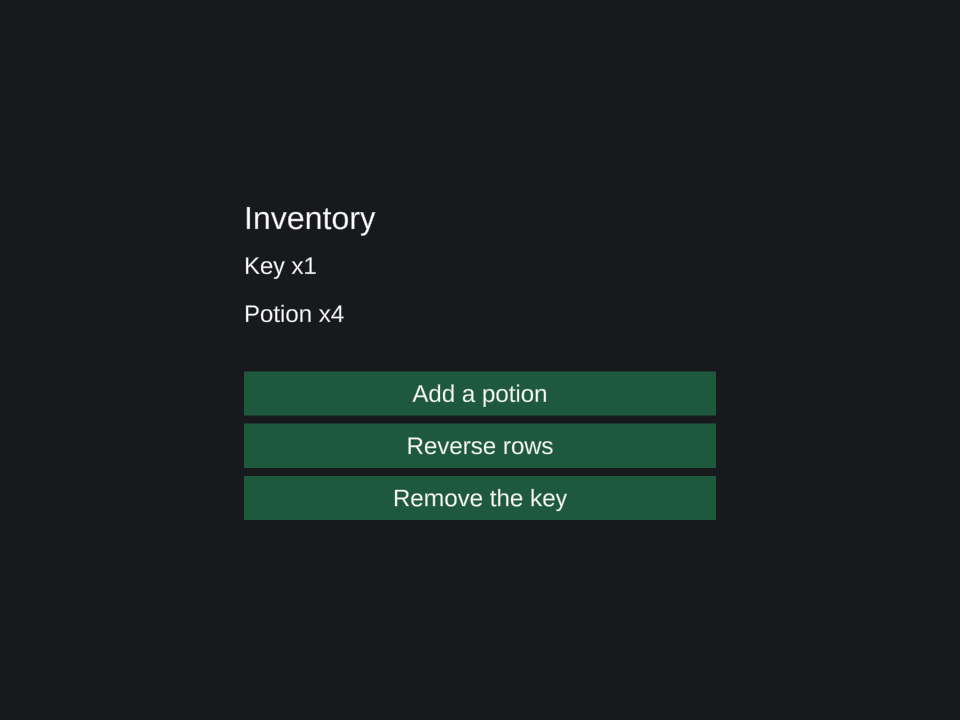
See retention in action
Click Add a potion: the quantity changes through the existing row's source. Click Reverse rows: the same row objects move to the new order. Click Remove the key: its row is removed and its scope is disposed.
Indexes receives key/value pairs. The integer Item.Id is the permanent key; Source<Item> supplies the current record to its retained row. Using the array position as a key would describe a position rather than this item's identity. Every key must be unique and non-null under the selected comparer.
The methods replace the array and changed records. This makes each state change explicit. If you choose in-place edits elsewhere, call Notify() on the owning source after the edit.
Choose the list operator
Use keyed Indexes for records whose values can change while their IDs remain stable. Values instead retains unique values and supplies their current reactive index. See the conditional UI tutorial and keyed lists API for both forms and retained exit transitions.
Children reconciles the returned row components. Disposing the mount disposes all row scopes. This example shows a small visible list; use native layout and scrolling appropriate to your own inventory screen.
Connect quantities to a reactive game HUD, or learn state-to-UI bindings.